
|
PCDVD數位科技討論區
(https://www.pcdvd.com.tw/index.php)
- 顯示卡討論區
(https://www.pcdvd.com.tw/forumdisplay.php?f=8)
- - NVIDIA GeForce Game Ready & Studio Driver 591.44 WHQL
(https://www.pcdvd.com.tw/showthread.php?t=1216701)
|
|---|
NVIDIA GeForce Game Ready & Studio Driver 591.44 WHQL
GeForce Game Ready & Studio Driver
版本編號: 591.44 WHQL (r591_37-3) 發佈日期: 2025年12月4日 作業系統: Windows 10 / 11 (僅x64的DCH版) 支援語系: 多國語言版 發行重點 • 此遊戲準備驅動程式為使用NVIDIA DLSS技術的新遊戲提供支援,並為您提供零時差的最佳遊戲體驗。 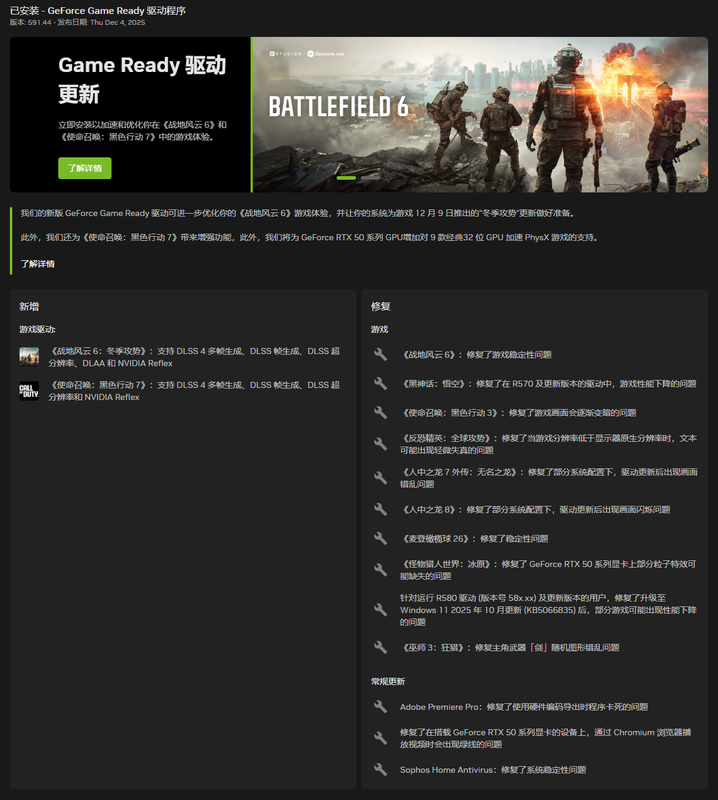 遊戲支援 • 為Battlefield 6: Winter Offensive(戰地風雲6:冬季攻勢)、Call of Duty: Black Ops 7(決勝時刻:黑色行動7)提供DLSS 4技術的最佳遊戲體驗。 • 為GeForce RTX 50系列GPU提供對於32位元的PhysX特效加速支援。  驅動元件: R591.44 (r591_37-3) / 32.0.15.9144 (12-2-2025) HD Audio 1.4.5.6 Vulkan API 1.4.325 OpenGL 4.6 OpenCL 3.0 CUDA 13.1.86 APP 11.0.5.420 PhysX 9.23.1019 USBC 1.52.831.832 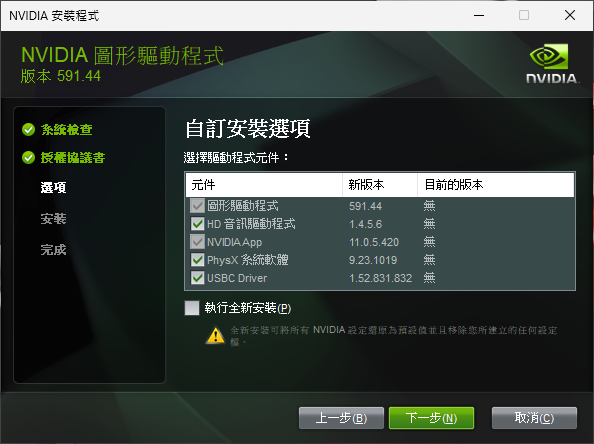 驅動核心編號對照表: R591.44 WHQL (r591_37-3) R581.94 Hotfix (r581_66-10) R581.80 WHQL (r581_66-7) 此版已修復的遊戲問題: • Battlefield 6(戰地風雲6):遊戲穩定性問題。[5582125] • Counter-Strike 2(絕對武力2):當遊戲內解析度低於顯示器的原生解析度時,文字可能會略微失真。[5278913] • Like a Dragon: Infinite Wealth(人中之龍8:無盡財富):某些系統配置下驅動程式更新後出現燈光閃爍。[5432356] • Like a Dragon Gaiden(人中之龍7外傳:英雄無名):某些系統配置在驅動程式更新後出現損壞。[5432356] • Black Myth: Wukong(黑神話:悟空):在R570之後的驅動程式分支中效能較低。[5562283] • Monster Hunter World: Iceborne: 部分粒子特效在GeForce RTX 50系列GPU上可能會缺失。[5546598] • Call of Duty: Black Ops 3(決勝時刻:黑色行動3):遊戲畫面會隨著時間而變暗。[5488108] • Madden 26(麥登橄欖球26):穩定性問題。[5535693] • 執行R580分支驅動程式(58x.xx)或更高版本的使用者在更新至Windows 11 2025年10月KB5066835後,可能會發現某些遊戲的效能下降。[5561605] • The Witcher 3(巫師3:狂獵):主角劍的隨機腐化。[5363151] 此版已修復的一般問題: • Adobe Premiere Pro:使用硬體編碼匯出時卡死。[5431822] • Sophos Home Antivirus(防毒軟體):系統穩定性問題。[5581371] • RTX 50系列GPU:使用Chromium瀏覽器觀看影片時會出現綠線。[5535388] 未解決的已知問題: • 無法從NVIDIA控制面板中取消「顯示通知托盤圖示」。[5622213] 此版驅動程式的更新文件: (英文) 資訊來源網頁 此版驅動程式的官方討論串: (英文) 資訊來源網頁 驅動程式問題的回報窗口: (建議使用英文填寫,或是利用谷歌翻譯先將您的回答轉換成英文) 資訊來源網頁 下載網頁: Win10&Win11-64bit (DCH版) Win10&Win11-64bit (Notebook;DCH版) Win10&Win11-64bit (Studio/DCH版) Win10&Win11-64bit (Notebook;Studio/DCH版) 下載檔案: Win10&Win11-64bit (DCH版) Win10&Win11-64bit (Notebook;DCH版) Win10&Win11-64bit (Studio/DCH版) Win10&Win11-64bit (Notebook;Studio/DCH版) 產品支援清單: GeForce RTX 50 系列 GeForce RTX 5090 D v2, GeForce RTX 5090 D, GeForce RTX 5090, GeForce RTX 5080, GeForce RTX 5070 Ti, GeForce RTX 5070, GeForce RTX 5060 Ti, GeForce RTX 5060, GeForce RTX 5050 GeForce RTX 40 系列 GeForce RTX 4090 D, GeForce RTX 4090, GeForce RTX 4080 SUPER, GeForce RTX 4080, GeForce RTX 4070 Ti SUPER, GeForce RTX 4070 Ti, GeForce RTX 4070 SUPER, GeForce RTX 4070, GeForce RTX 4060 Ti, GeForce RTX 4060 GeForce RTX 30 系列 GeForce RTX 3090 Ti, GeForce RTX 3090, GeForce RTX 3080 Ti, GeForce RTX 3080, GeForce RTX 3070 Ti, GeForce RTX 3070, GeForce RTX 3060 Ti, GeForce RTX 3060, GeForce RTX 3050 GeForce RTX 20 系列 GeForce RTX 2080 Ti, GeForce RTX 2080 SUPER, GeForce RTX 2080, GeForce RTX 2070 SUPER, GeForce RTX 2070, GeForce RTX 2060 SUPER, GeForce RTX 2060 GeForce 16 系列 GeForce GTX 1660 SUPER, GeForce GTX 1650 SUPER, GeForce GTX 1660 Ti, GeForce GTX 1660, GeForce GTX 1650, GeForce GTX 1630 GeForce RTX 50 系列 (Notebooks) GeForce RTX 5090 Laptop GPU, GeForce RTX 5080 Laptop GPU, GeForce RTX 5070 Ti Laptop GPU, GeForce RTX 5070 Laptop GPU, GeForce RTX 5060 Laptop GPU, GeForce RTX 5050 Laptop GPU GeForce RTX 40 系列 (Notebooks) GeForce RTX 4090 Laptop GPU, GeForce RTX 4080 Laptop GPU, GeForce RTX 4070 Laptop GPU, GeForce RTX 4060 Laptop GPU, GeForce RTX 4050 Laptop GPU GeForce RTX 30 系列 (Notebooks) GeForce RTX 3080 Ti Laptop GPU, GeForce RTX 3080 Laptop GPU, GeForce RTX 3070 Ti Laptop GPU, GeForce RTX 3070 Laptop GPU, GeForce RTX 3060 Laptop GPU, GeForce RTX 3050 Ti Laptop GPU, GeForce RTX 3050 Laptop GPU GeForce RTX 20 系列 (Notebooks) GeForce RTX 2080 SUPER, GeForce RTX 2080, GeForce RTX 2070 SUPER, GeForce RTX 2070, GeForce RTX 2060, GeForce RTX 2050 GeForce MX500 系列 (Notebooks) GeForce MX570, GeForce MX550 GeForce MX400 系列 (Notebooks) GeForce MX450 GeForce GTX 16 系列 (Notebooks) GeForce GTX 1660 Ti, GeForce GTX 1650 Ti, GeForce GTX 1650 |
這是R590驅動的首個正式版;實測2060的跑分性能是還不錯,但唯一問題就是華碩的應用軟體會遇到相容性錯誤而無法運作,而微星的應用軟體則是能正常使用。 :rolleyes:
遊戲跑分設備: 中央處理器i7-7700,顯示卡RTX2060-6G,作業系統Win11-25H2。 FF14(最終幻想14)跑分測試: R595.02(併用581.94組件) = 12039 R595.02(併用590.26組件) = 12020 R595.02(併用VK581.89組件) = 12051 R591.44 = 12006 The Last Remnant(最後遺跡)跑分測試: R595.02(併用581.94組件) = 282.78fps R595.02(併用590.26組件) = 282.41fps R595.02(併用VK581.89組件) = 282.67fps R591.44 = 286.68fps |
引用:
是華碩的控制軟體Armoury Crate出問題嗎? 我更新591.44之後沒有問題喔 Armoury Crate正常開啟 耳機、滑鼠、鍵盤全都能正常調整設定 玩了幾個遊戲 沒有啥明顯問題 |
引用:
有幾位說Armoury Crate抓取不到任何的相關裝置,而GPU Tweak III則是啟動後會出現錯誤訊息或閃退。 :jolin: |
1個附加檔案
引用:
我的很正常 應該是其他軟體導致的衝突 系統w11 25h2(26200.7309) 顯卡4090 |
引用:
是RTX 50系使用者會遇到錯誤 還有色彩會忽然變暗沉 目前RTX 50建議在觀望一下 PhysX支援32BIT問題有小多 |
4080,配這版玩ff14台版,4k全開+dlss,一切正常,感覺幀數有比較高一點 :)
|
那位B站大佬說有去查看CPU-Z,遊戲準備驅動會將5090D鎖定在PCI-E 3.0,STUDIO版則是可以正常執行在PCI-E 5.0,看樣子我也該換來試試。 :jolin:
|
引用:
看來這一代5090因為鬼島盤子價 店家還跩個二五八萬的 讓我極度不爽所以選擇跳過並不是件壞事 驅動都在50系列出幾次包了... :jolin: 買的人不只當了商家盤子 還要當老黃家驅動的白老鼠 雖然對某些人很失禮 但我還是幸災樂禍的笑了 :laugh: :laugh: :laugh: |
引用:
巴哈某位5090的使用者說他PCI-E 5.0顯示正常。 :confused: 剛也實測STUDIO版,FF14的跑分差別不大,所以已經返回遊戲準備驅動。 :ase 另外,關於ASUS的某些應用軟體會遇到相容性問題而無法正常運作,也有不少人回報說使用正常。 :flash: |
| 所有的時間均為GMT +8。 現在的時間是03:37 PM. |
vBulletin Version 3.0.1
powered_by_vbulletin 2026。